SoscoraAn app bySoluptions
ES

Free iPhone app for emergencies

Help, even whennothing else works.

First aid, SOS signals and messages with no signal or internet. Free, private, no account.

Coming soon to the App StoreSee how it works
  • Works offline
  • Free, always
  • No account
  • Data Not Collected
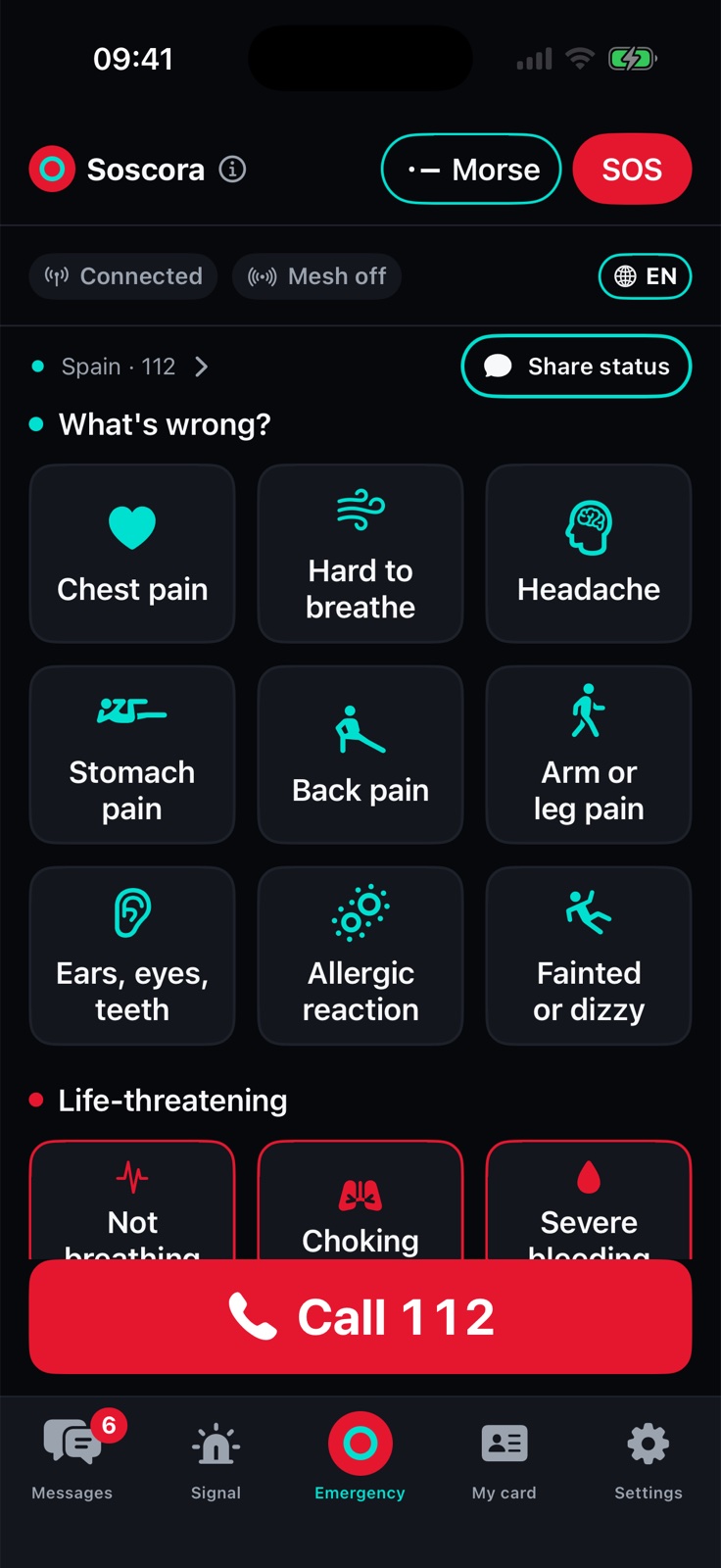
Soscora’s Emergency screen: “What’s wrong?” tiles, life-threatening situations in red and a red Call 112 button.

What still works

Whatever is left,Soscora uses it.

  1. 1

    The network works

    Normal day, accident, illness

    A one-tap call to the right local emergency number, step-by-step guidance while you wait, and your medical card for helpers.

  2. 2

    The network is down, but people are around

    Blackout, earthquake, flood, crowded event, network overload

    Phone-to-phone messages over Soscora Mesh: SOS to people nearby, private and family messages, family check-in.

  3. 3

    Nothing works and nobody nearby has the app

    Lost, trapped, alone, remote

    Signals anyone recognises: SOS by flashlight, screen, sound and vibration, Morse, a loud rescue tone, your coordinates as text, and your card on the lock screen.

Everything you need when nothing else works

Two kinds of communication.Both still work.

Communication when networks fail

Talk with no network

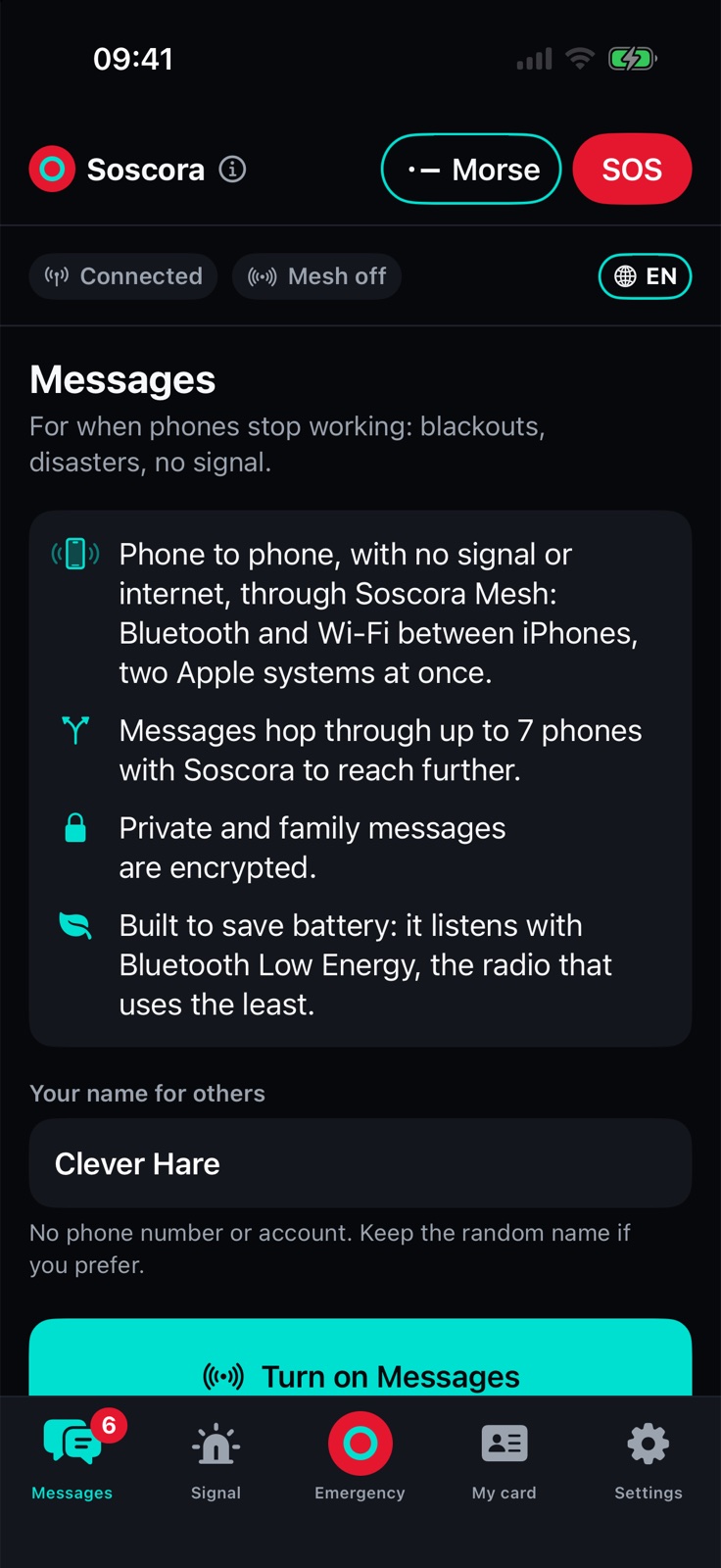
Soscora Mesh carries messages directly from phone to phone, with no mobile signal, no internet and no Wi-Fi network.

  • Everyone: a local public chat for SOS alerts and updates
  • Private and Family: end-to-end encrypted
  • Messages hop through up to 7 phones and wait up to 24 hours
  • Keeps working with the app closed
The Messages tab: phone to phone through Soscora Mesh.

Critical communication

Get help when your life is at risk

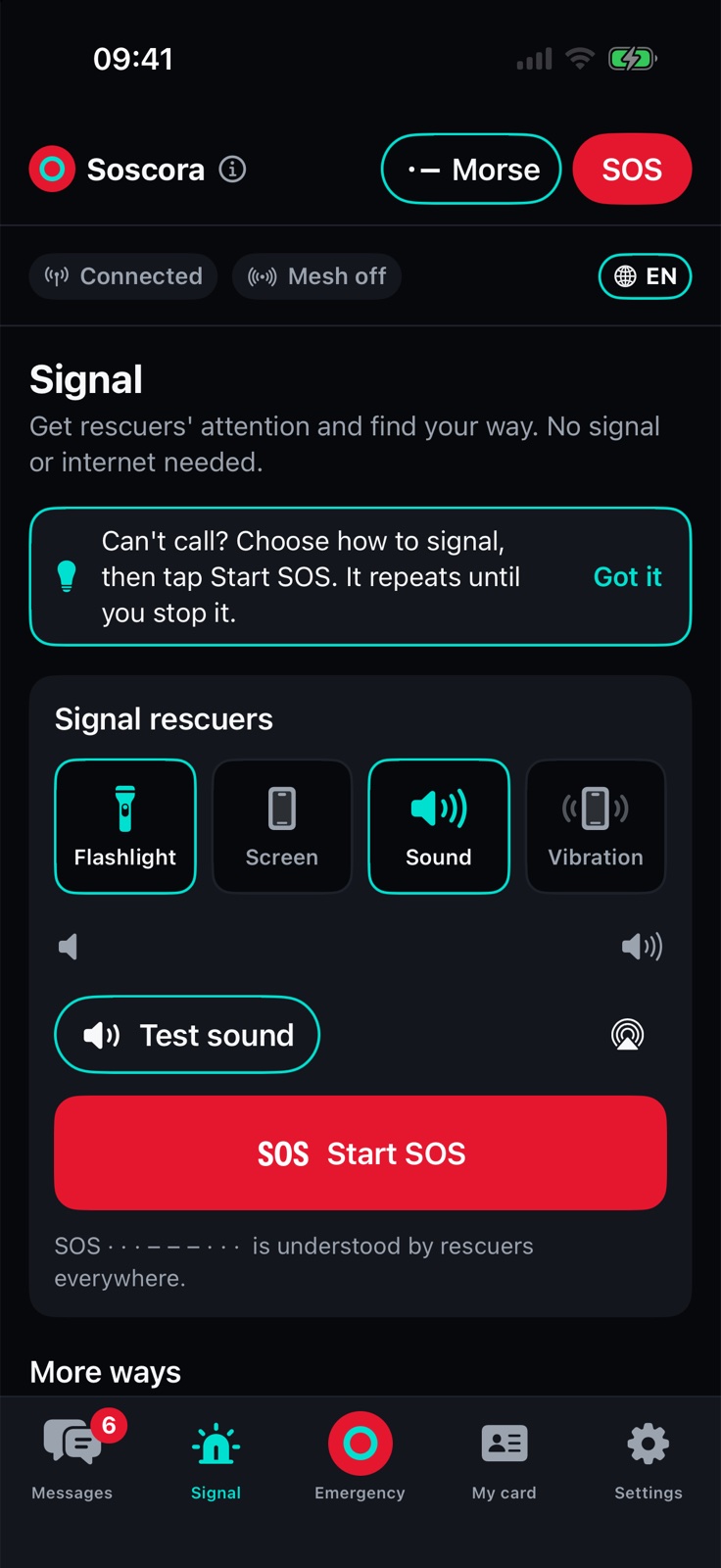
One tap on the red SOS button flashes the light and sounds SOS until you stop it. Rescuers worldwide recognise it, even people without Soscora.

  • SOS to everyone nearby with Soscora
  • Flashlight, screen, sound and vibration, Morse and a loud rescue tone
  • A one-tap call to the local emergency number, in 237 countries and territories
  • Your position as coordinates and a Plus Code, read aloud if you need it
The Signal tab: flashlight, screen, sound and vibration, and a red Start SOS button.

And everything around them

Family safety

“Is my family OK? Do they know I am?”

Pair your family, ask everyone “Are you OK?” with one tap, and see each answer on one board.

Know what to do

“Someone is hurt. What do I do right now?”

The Emergency screen, 13 step-by-step guides read aloud, and a CPR metronome you can practise with.

Your phone speaks for you

“I can’t speak, or I don’t speak the language.”

My card with your medical details and contacts, an optional lock screen card, and 8 phrases in 20 languages.

Be ready

“How do I prepare before it happens?”

CPR practice, family pairing ahead of time, Siri, the Action button, Control Center and widgets.

Why now

Networks fail more oftenthan people expect.

When the power goes, mobile networks follow within hours. Floods, fires and storms cut them exactly where people need them, and big events overload them just when everyone tries to call. People lose three things at once: the way to call for help, the way to reach their family, and the calm to know what to do.

  • The blackout across Spain and Portugal on 28 April 2025. ENTSO-E report
  • The floods in Valencia, Spain, on 29 October 2024, which damaged the telecommunications networks. Government of Spain

Soscora is built for exactly that moment.

Family safety

One tap:is everyone OK?

After an earthquake, a flood or a blackout, the first thing everyone wants to know is whether their family is OK. Usually that means dozens of calls that never connect. With Soscora it is one tap, and an answer you can see at a glance, with no network.

  1. Tap Ask family: are you OK?
  2. Each person gets a notification and answers with one tap. The answer goes privately to you, end-to-end encrypted.
  3. Under each name you see their latest answer and how long ago it came, or that you are still waiting.
  • I’m safe
  • I need help
  • Injured
  • Need water

“I need help” and “Injured” are treated as urgent: a red badge and the SOS tone, even during a Focus.

Pair your family today, while you’re together. In a disaster, it’s too late.

Both phones side by side: Messages › Family › Add family. If the 6-digit codes match, tap Codes match. Up to 12 people.

How Soscora Mesh works

The more people have it,the further it reaches.

Messages travel directly between iPhone devices running Soscora, over Bluetooth Low Energy and direct Wi-Fi between nearby phones. No router, mobile network or server is involved.

  1. 1

    You write a message

    Your phone sends it to every phone with Soscora in range.

  2. 2

    It hops from phone to phone

    Each phone passes it on to the phones in its range, up to 7 phones. Urgent messages go first: SOS, then status, then private messages, then public chat.

  3. 3

    It waits if nobody is near

    Phones keep messages for up to 24 hours and hand them on when someone comes close. Private messages show Delivered only when a signed receipt comes back.

Soscora keeps working when it’s closed, even with the phone locked. Keep Soscora in the background; don’t swipe it away.

  • Messages only travel through phones that have Soscora with Messages turned on.
  • Soscora is for iPhone today. There is no Android version yet.
  • Soscora Mesh is not satellite messaging, and it doesn’t replace calling emergency services.

Install it, and you also help the people around you.

Private by design

Nothing to sign up for.Nothing collected.

  • Soscora makes zero internet requests. Its only connections are directly between phones.
  • No account, no sign-up, no phone number. People nearby see only the name you choose.
  • No analytics, no ads, no tracking. App Store privacy label: Data Not Collected.
  • Private and family messages are end-to-end encrypted. Phones that pass them on can’t read them, and can’t tell who sent them or who they’re for.
  • Your emergency card never leaves your iPhone.
  • Permissions are asked only when you turn on the feature that needs them.
Read the privacy policy

Get ready in 5 minutes

Five minutes nowsave time later.

English and Spanish, switchable in one tap. The largest text sizes, VoiceOver, right-to-left layouts, Light, Dark or System theme. iPhone with iOS 17 or later.

  1. Fill in My card.
  2. Pair your family.
  3. Turn on Messages.
  4. Practise CPR.
  5. Add Soscora to the Action button or Control Center.

For communities and organisations

Every installationstrengthens the network.

  • Soscora is free, for everyone who installs it.
  • Each phone with Soscora carries messages for the people around it.
  • It complements, and never replaces, emergency services and public alert systems.

Civil protection, volunteers, schools or neighbourhoods: write to us at hello@soscora.com

Questions

Does it work without signal or internet?

Yes. Guides, signals, the card, the compass and phrases work fully offline. Messages travel phone to phone over Bluetooth and direct Wi-Fi, with no network.

Can messages pass through phones without Soscora?

No. Only phones with Soscora and Messages turned on pass messages along. That’s why it helps to invite family and neighbours.

How far do messages go?

Each hop is the range of a phone’s Bluetooth or Wi-Fi. A message can hop through up to 7 phones and wait up to 24 hours for someone to come in range. Real-world range depends on the place and on how many people nearby have Soscora.

Does it work with the app closed?

Yes, in the background and with the phone locked. If you swipe Soscora away in the app switcher, iOS pauses it until you open it again.

Is there an Android version?

Not yet. Soscora is for iPhone today.

Is it free?

Yes, always. No ads, no purchases, no subscriptions.

What data do you collect?

None. No account, no analytics, no internet requests.

Can strangers read my messages?

Messages in Everyone are public to people nearby. Private and family messages are end-to-end encrypted.

Does Soscora call emergency services for me?

No. It never calls or texts anyone automatically. You stay in control; the Call button dials your local emergency number when you tap it.

Is the medical content reviewed?

The guides follow widely taught first-aid steps. Their medical review is pending. They give first-aid guidance only and never replace emergency services.

Who makes Soscora?

Soluptions, which works on business, processes and technology. Soscora is one of its own apps.

Help, even whennothing else works.

Coming soon to the App Store